Devlog 9 — February 2024
The Console Needs to Sound Right
Switching to Unreal was the big leap. But the engine migration only gave me the room — I still needed to fill it with a console that actually works. The Never console in the Unity version had years of audio logic behind it. Starting over meant rebuilding the entire signal path from scratch. This time, I had MetaSounds.
MetaSounds is Unreal Engine’s node-based audio system, and it’s the single biggest reason I don’t regret the switch. In Unity, I was fighting DOTS Audio promises that never materialised, stitching together workarounds with third-party plugins and custom C# scripts. MetaSounds just does what it says on the box. You patch nodes together, audio flows through them in real-time, and you can build anything from a simple volume fader to a full parametric EQ — all inside the engine, no external DSP libraries needed.
I started with the channel strip. Each channel on the LLC needed gain, a high-pass filter, four-band parametric EQ, compression, pan, and a fader — all processing audio in real-time with low enough latency that you don’t feel the disconnect between moving a knob and hearing the change. MetaSounds handled it. I built the EQ section as a reusable patch, wired it into every channel, and suddenly had 24 channels of real-time processing running without breaking a sweat. In Unity, getting that kind of per-channel processing at VR frame rates was a constant battle. Here, it just seem to work.
The aux sends and subgroup routing came next. Being able to patch audio from any channel to reverb buses, effects returns, and mix groups — all inside MetaSounds — felt like working with actual hardware patch bays. The visual node graph even looks a bit like a signal flow diagram, which made debugging intuitive. When something sounds wrong, you can literally trace the audio path visually.
The VR Interaction Problem
Audio was the exciting part. VR interaction was the frustrating part.
In Unity, I had XR Interaction Toolkit and years of custom grabbing, pointing, and UI interaction code that I’d refined over multiple devlog entries. In Unreal, VR interaction is surprisingly underdeveloped for an engine that markets itself as premium. The built-in VR template is basic — fine for picking up cubes, not fine for operating a mixing console with dozens of faders, rotary knobs, and buttons that all need different interaction behaviours.
I tried several approaches. Epic’s built-in VR template was the starting point, but it lacked the precision I needed — faders need to move on a single axis, knobs need rotational input mapped from hand movement, and buttons need tactile press-and-release behaviour. I looked at a few community frameworks and plugins, each with their own opinions about how VR hands should work.
Then I found VReUE4.
VReUE4 — The Framework That Clicked
VReUE4 is a VR interaction framework for Unreal that does the fundamentals well — grabbing, throwing, hand presence, physics interaction — without trying to be everything. What sold me was the architecture. It’s built around components you attach to actors, so extending it with custom interaction types (like my fader behaviour or knob rotation logic) was straightforward once I understood the pattern.
The first few days were the usual Unreal learning curve. Blueprint spaghetti, things not connecting the way I expected, hands flying through objects. But once I got the core grab mechanics working and understood how VReUE4 handles hand attachment and release, the rest came fast. Genuinely fast. I had fader interaction working within a day. Rotary knobs took another day. Button presses — half a day.
Compare that to the weeks I spent in Unity getting XR Interaction Toolkit to do custom constrained movement. The difference wasn’t just the framework — it was that VReUE4’s component-based approach mapped naturally to how a mixing console works. Each control is its own actor with its own interaction behaviour. Snap it on, configure the constraints, done. At least, in theory. I made a child class of most elements just to handle m special needs, but it’s still evolving each day.
Testing the LC
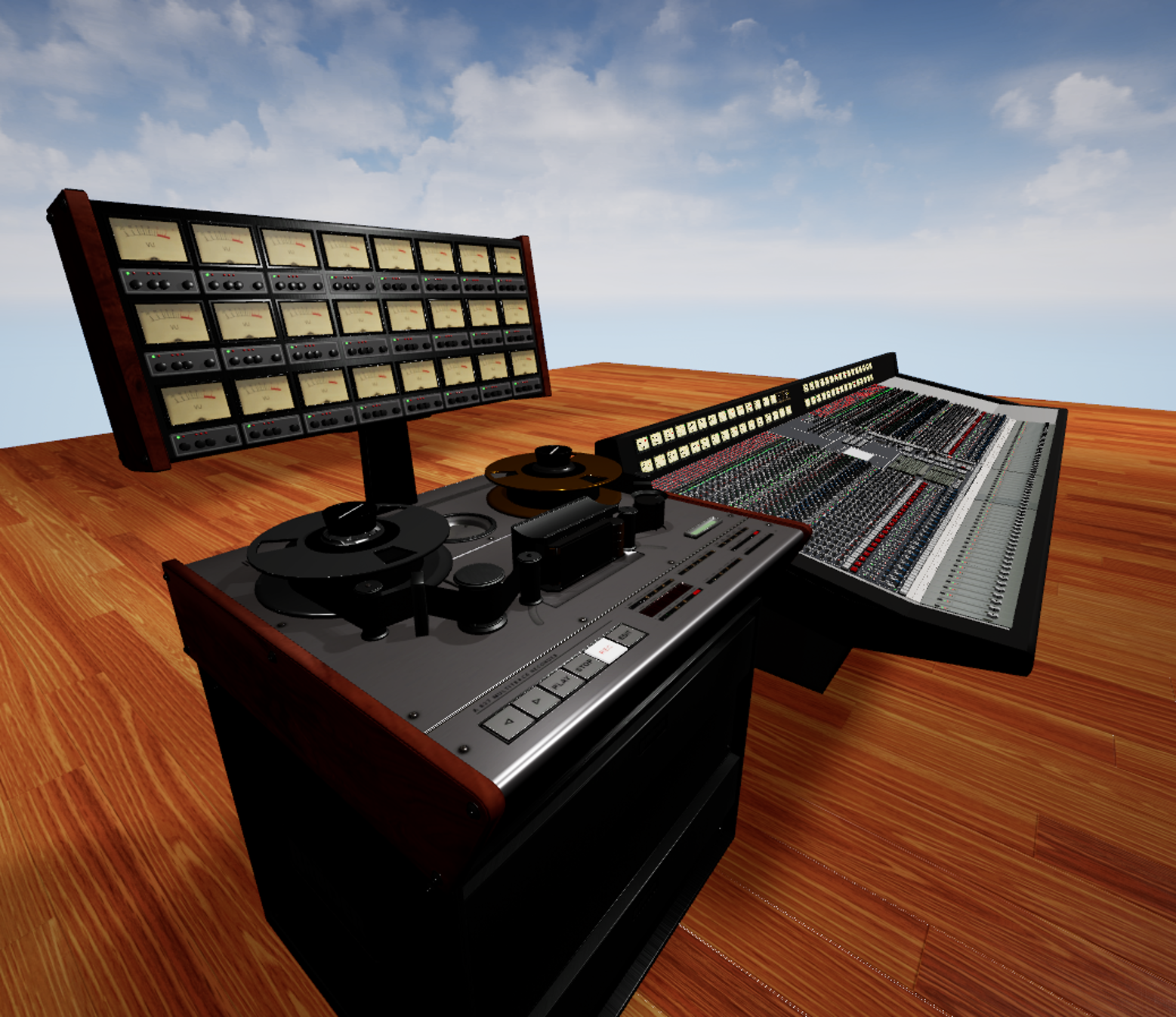
With MetaSounds handling audio and VReUE4 handling interaction, I could finally test the console as a complete system. Load stems, push faders, hear the mix change in real-time. Twist an EQ knob, hear the frequency shift. It sounds obvious — that’s what a mixer does — but getting all these pieces working together in VR, at frame rate, with no perceptible latency between hand movement and audio response, is genuinely difficult. I also had to add the Brüder tape machine from my unity project to be able to play some tracks. Now it does 24, nearly in sync, so that’s fine for now.
The video above shows where things stand. The LLC console is operational — not finished, but operational. Faders move, EQ responds, levels show on the meters, and the mix actually changes when you work the board. It’s the first time in the Unreal version that the studio feels like a studio and not just a 3D model you can walk around in.
What’s Next
The foundation is solid now. MetaSounds for audio, VReUE4 for interaction, Unreal’s renderer making everything look better than it has any right to at 90fps. The next priorities are the dynamics section (compressor and gate per channel), aux effects (reverb and delay on send buses), and the multitrack tape machine integration — because loading stems through a debug menu isn’t exactly the vintage workflow I’m going for.
Eight years in, and the console is finally starting to feel like the real thing.