MIDI MIXINGLAB
Version 1.0 • 1995–2026
A MIDI mixer rediscovered. Now running in your browser.
Found a floppy in the shed the other day. Hooked it up to an old USB floppy drive, ran it through a floppy emulator, and out came the source code to something I hadn’t thought about in nearly 30 years: MIDI Mixinglab 1.0—a MIDI controller app I built in 1995/1996 on my Atari ST, written entirely in GFA Basic. The source code was still readable. So I did what any retrotech archaeologist would do: I reconstructed it in HTML5 and got it running in a browser. And now it’s playable right here.
The Context: Music-Making on Atari
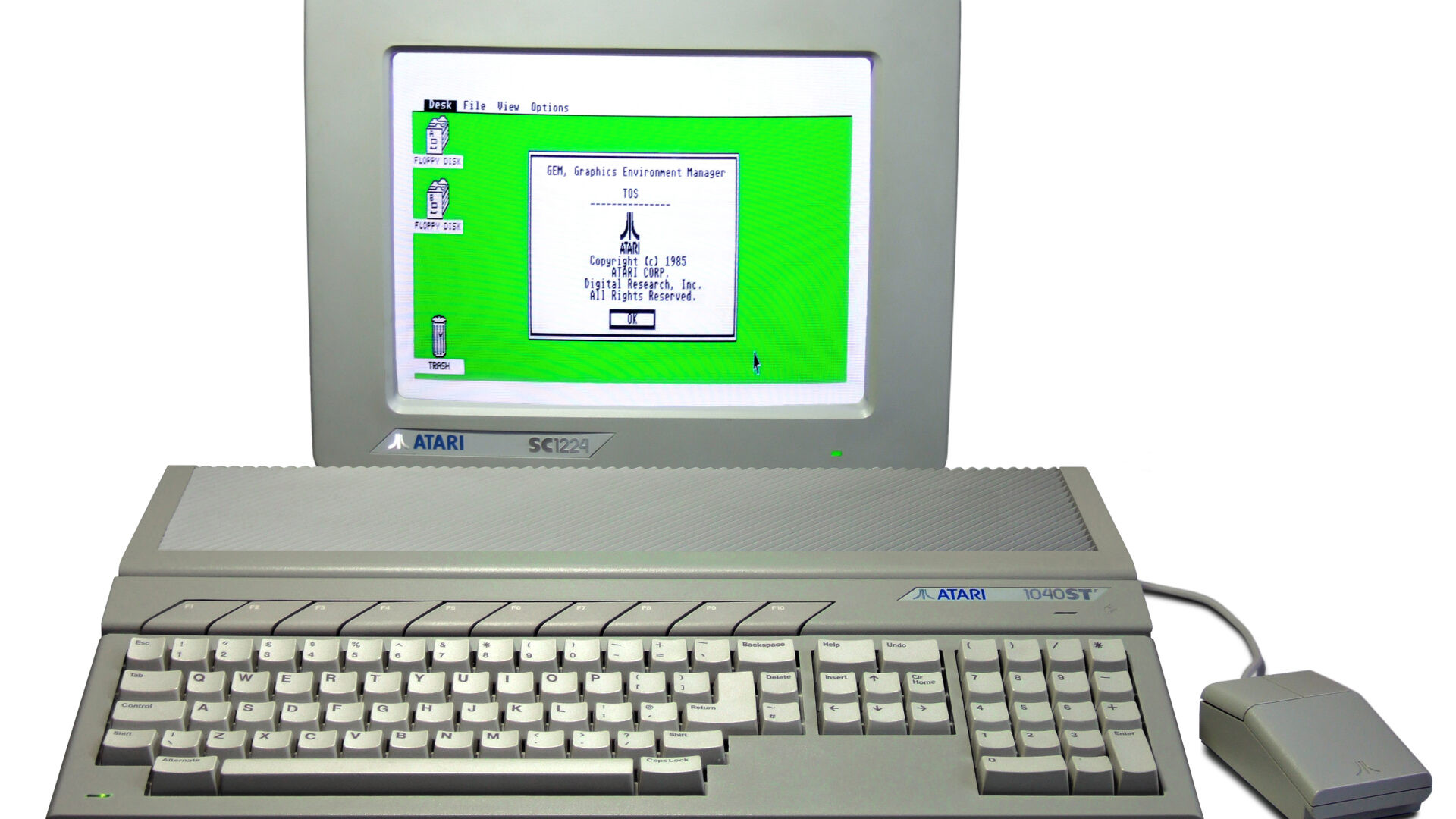
The mid-1990s were a unique moment for home musicians. The Atari ST—with its built-in MIDI ports and blazing fast Motorola 68000 processor—had become the de facto standard for sequencing and production. Cubase ran on it. So did Notator, Cakewalk, and a dozen other trackers and drum machines.
My setup was typical for the era: an Atari ST, a Roland MT-32 (the holy grail of consumer sound modules), a Korg P3 piano module, Yamaha SY22 and CS 1X synths, an Akai S700 sampler, and a Keytek CTS2000. All of them had MIDI IN and OUT. All of them could send and receive program changes, volume data, and MIDI dumps.
But here’s the friction point: if I wanted to quickly tweak the volume on the MT-32 or switch banks on one of my synths without firing up Cubase, I was stuck. I could send MIDI from a keyboard, sure, but what if I wanted to control all 16 MIDI channels from a single interface? What if I wanted to send program changes without loading an entire DAW?
So I built Mixinglab.
The Atari Journey
The reconstruction brought back the whole hardware arc. I started on a stock Atari 520ST—512KB of RAM, single-sided floppy drive (360KB). Cubase wouldn’t run on that, so I hand-soldered 16 memory chips directly onto the mainboard, wiring up the RAS and CAS lines to upgrade the machine to 1MB. That was just enough to get Cubase running.
Then I upgraded to an Atari STE (with a hard drive—a revelation). Later came the Mega ST4, and finally the Atari TT030—the ultimate Atari: 32 MHz processor, 8MB of RAM, and 640×480 resolution in color. That machine could run seriously professional software. By then, Mixinglab could use real screen real estate.
The original binary even predicted this: the greetz scroll mentions “Coming in the near future: TT orientated demo’s and programm’s (if I get GFA 3.6 soon).” We never shipped a TT version, but the UI was always designed to scale to any resolution. Click the TT-030 button below to see 640×480 in action—it’s the resolution that Mixinglab was built to dream about.
The Problem It Solved
Mixinglab wasn’t fancy. It was a MIDI mixer in a box—16 faders (one per MIDI channel), mute buttons, program change controls, MIDI thru mode, and file load/save for quick presets.
The killer feature: it was always there. You could minimize Cubase, launch Mixinglab, tweak your MT-32 reverb level, send a program change to the SY22, P3, or CS 1X, flip a mute, then close it—all without reloading your sequencer. For a machine with 512KB or 1MB of RAM, that mattered.
The interface was classic GEM (Graphical Environment Manager)—the Atari’s native windowing system—with hand-built 3D buttons using halftone fills and beveled edges. This was before Windows 95, before Aqua. The aesthetic of Mixinglab was pure 1995 Atari: monochrome-ish backgrounds, pixel-perfect UI coordinates, and greetz scrolling at the bottom.
How It Worked
When you launched Mixinglab, it would detect your monitor resolution via XBIOS call #4:
- ST-low (320×200, 16 colors) — the old workhorse mode
- ST-medium (640×200, 4 colors) — the weird wide mode
- ST-high (640×400, monochrome) — the proper resolution for productivity
- TT-030 (640×480, color) — the dream machine
Every UI element—every fader groove, every button, every label—would scale proportionally. The coordinates were stored as fractions of screen width and height. Write once, scale everywhere. It was a lesson in resolution-independent design that modern designers keep rediscovering.
The main screen showed:
- 17 vertical fader columns (16 MIDI channels + 1 master)
- 16 mute buttons below the faders (for each channel)
- Sections for different controls: MIDI channel selector, program change +/−, volume controls, THRU toggle, NOTE OFF, RESET
- Status info at the bottom, scrolling credits and greetz
Each fader could send volume (CC#7) or any other continuous controller to the corresponding MIDI channel. The mutes sent all-notes-off. Program changes let you flip between patches on your synths without touching the keyboard.
The Reconstruction: From GFA Basic to Canvas
GFA Basic was Atari’s answer to QuickBASIC. It was verbose, procedural, and compiled—you’d write in tokenized form, and it would produce a .PRG binary. The source I found was still legible: procedures for drawing 3D buttons (the zest_button and zest_info_box routines), resolution detection, MIDI event handling, and screen refresh loops.
Reconstructing it meant:
- Parsing the coordinate formulas — Every button position was
maxx * 0.15, every fader height wasmaxy * 0.75. I extracted all of them. - Recreating the GEM 3D look — Halftone fill (checkerboard pattern of white and black pixels), white highlights on the upper-left, black shadows on the lower-right. Classic beveled plastic.
- Implementing the UI logic — Fader dragging, button click detection, MIDI channel/program change increment/decrement.
- Embedding the greetz scroll — The original binary included a credits message thanking the members of “Save Group BBS” and a few co-conspirators. I kept it verbatim.
The result is a faithful HTML5 reconstruction that runs in any modern browser. No MIDI support (that’s beyond the scope), but all the visual and interactive logic is there.
Try It Yourself
Interactive Mixinglab — Click resolution buttons, drag the faders, toggle mutes
You can also run the original binary in Hatari (an open-source Atari emulator). The source code, compiled binary, and a bootable floppy image are available for download—see the end of this post.
The BBS Era
There’s a cultural artifact embedded in Mixinglab that’s easy to miss: the greetz.
Marald Bes & Maarten van Reeuwijk present: Mixinglab version 1.0
Call the save group bbs to reach me (tel: 0172-588849)
…Greetinz’ go to: The members of the save group BBS,
Rembrandt Leliveld (the PC connection), Maarten van Reeuwijk
(his exclusive C routines), Jeroen de Leur for stimulating me
to programm on atari…
This is pure 1990s Atari scene culture. We were small communities, scattered across Europe and North America, connected by telephone lines and 2400-baud modems. Software was shared through bulletin board systems (BBSes)—dial-up services run by hobbyists out of their bedrooms. You’d call, upload your latest program, leave a message for the sysop, and hope your MIDI code was good enough to stick around.
There was no GitHub. There were no package managers. There was just: Call this BBS, and you can have my thing.
Technical Reflections
A few things stand out when I look at this code 30 years later:
- Resolution independence was essential on Atari. People had different monitors, different refresh rates, different color depths. That said, nobody actually used color monitors with MIDI work—but at least I didn’t have to disconnect my monitor after playing a game just to get MIDI through on the computer. The lesson: your UI should adapt, not break.
- Memory was precious. Hand-soldering chips to upgrade RAM by a factor of 2 was the only solution—there were no SIMM slots on the original Atari (those came with the STE and Mega ST). Every byte counted.
- GFA Basic was surprisingly capable. Yes, it was BASIC. But it had bitblt (block image transfer), direct access to XBIOS calls, and the ability to build real applications. It’s easy to dismiss BASIC, but people built serious software in it.
- MIDI was simpler then. No USB negotiation, no permissions dialogs. Just MIDI IN and MIDI OUT. A 5-pin DIN connector. Plug and play in the truest sense.
- Greetz and credits mattered. Every piece of scene software had them. It was how you built reputation and community.
Files & Emulation
The original source (MIXER.LST), compiled binary (MIXER.PRG), and a bootable Atari ST floppy image are available for download. If you want to run the binary:
- Install Hatari — an open-source Atari ST emulator (
brew install hatarion macOS) - Mount the floppy image and boot it
- Double-click
MIXER.PRGto launch
The binary will auto-detect your emulated screen resolution and adapt. It’s an uncanny experience to watch a 1995 UI appear exactly as it looked 30 years ago, perfect pixel reproduction.
For curious developers, the GFA Basic source is fully readable and commented. It’s a textbook example of resolution-adaptive UI, MIDI event handling, and mid-1990s Atari programming practices.
Closing Thoughts
Finding Mixinglab was a small time travel. It reminded me of a moment when computers were smaller, weirder, more specialized—when you could still build a complete MIDI application in a few thousand lines of BASIC and distribute it through a bulletin board system to people you’d never met in person.
It also reminded me why I hand-soldered memory chips in the first place: to make something that worked better. Not faster (though that helped), but better for what I needed. Mixinglab was the same impulse: solve a real friction point, make it elegant, ship it.
The Atari ST is long gone. GFA Basic is obsolete. That telephone number doesn’t work anymore (I checked). Hand-soldering is a lost art.
But the UI? The logic? The aesthetic? All of it translated cleanly to HTML5. And that’s the beauty of software: if you design it well, it can outlive the platform it was born on.
Faders up to the scene. Faders up to Maarten van Reeuwijk and I. And faders up to everyone who called that BBS.
Download & Resources
- Hatari Emulator: https://hatari.tuxfamily.org/
- Reconstructed interactive version: Try it above (supports all Atari resolutions including TT-030)
- Original source code & binary: Available in the Retro Recordings archive
Mixinglab 1.0 © 1995–1996 Marald Bes & Maarten van Reeuwijk. Reconstructed in HTML5, June 2026.